
|
|
|
#1
 06-13-2012, 05:29 PM
|
||||
|
||||
|
Why does the camera...
Why does the camera not take good photos of a vintage set's screen?
Perhaps this has been discussed before. I looked back a year and found nothing. We've all seen it. Take a picture of a working set and there's a bar in there somewhere. Or, you see a scan (best I can describe it) that starts in one corner and ends in the other. Today, with places such as YouTube, there are so many videos of working sets. On color sets, it seems that the color doesn't appear correct. It seems that blue is usually dominant. Red is there, but quite limited. Green almost seems completely gone. Because of this, all secondary colors look way off. While watching videos on YouTube, I know that some of the people producing these videos are "top notch" regarding the quality of their work. Some of these people are members here. I have no doubt in their restoration abilities. On the other hand, the videos they post (or photos here) still look off. When I recap a set, I end up taking sooo many photos before I find one I like enough to post. Many times, blue ends up making a halo around the edges of the screen. I try turning on certain lights in the room while turning off others. Or, I wait till daylight in the afternoon while the sun is coming in from the West. Many times the color looks overdriven. Many of the photos I take look really off... but I finally get one that looks good. I don't bother with videos since it seems they never look good. Black and white sets are no easier. Many times, they look realy blue in a photo compared to what you actually see. It seems I have better luck taking photos with my cel phone camera compared to my digital camera. So what gives? Why do these photos look nothing like what we actually see in person? What are the annomalies we see in photos? Is there a way to reduce them? Would we have better luck using a film camera instead of digital? Any tips on taking photos?
__________________
Charlie Trahan He who dies with the most toys still dies. 
|
|
#2
06-13-2012, 05:48 PM
|
||||
|
||||
|
Some of it has to do with the fact that the TV picture is scanned; it's not "all there" at the same time and the camera is taking one instant in time, so you'll get scan bars representing what that picture "really looks like" at that fraction of a second. Sort of like looking through your fingers while waving your hand back and forth in front of a TV. The retentivity of the eye keeps the frames of movies or TV long enough so the frames blend into action. Also cameras are designed to take pictures mostly in daylight and the TV phospors don't produce that same sort of light. Not a very scientific explanation, I fear!

__________________
Reece Perfection is hard to reach with a screwdriver.
|
|
#3
06-13-2012, 07:45 PM
|
||||
|
||||

You are right
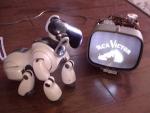
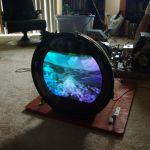
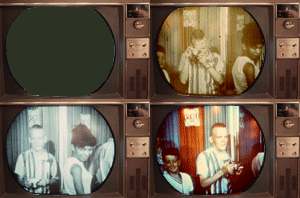
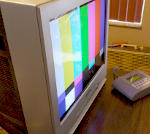
I just now tried to take a pic of the little Sony S8-301W.....next to a Sony ERS7M3, and my little JVC Everio that actually takes pretty good pics, had to have the shutter speed slowed WAY down, the ambient light mostly blocked.....AND the brightness on the Sony TV turned way down, just to get this pretty sorry looking pic. This thread made me curious, because I have had this sort of thing happen with trying to take a pic of ANY tv set....and most computer screens too. Please don't mind the state of dissasembly of the Sony 301. it's in the very middle of a recapping (which is now to the point of "pretty good...but still REAL fussy"). And this is a static image from an Archos AV700 going into my little 50mw HLLY "Villa" TV transmitter. The Sony is tuned to "just above channel 13" where I have my "pirate station" playing vintage commercials and TV sorta 24/7. The last pic is what right now passes for a crosshatch on this set right now. Still can't put any white test patterns on it though. The top of anything bright tears to the right REAL bad still. Last edited by AiboPet; 07-12-2012 at 07:07 AM.
|
|
#4
06-13-2012, 08:52 PM
|
||||
|
||||
|
The reason for incorrect colors with digital cameras is white balance not being set properly. Some cameras will not allow you to mess with this setting, which is why it's important to make sure you either have one that will allow you to mess with white balance or have a processing program that can make those changes (post processing).
My Pentax K20d has a bunch of different white balance modes, but they are only accessible in one of the manual modes (aperture or shutter priority or full manual). In auto mode, it guesses what the correct setting is. Because is guesses what the setting should be based on picture content, it's often wrong. It's worst with indoor fluorescent like tubes. Natural light it's right almost 100% of the time.
__________________
Evolution... 
|
|
#5
06-13-2012, 09:40 PM
|
||||
|
||||
|
Tripod
May need manual focus, try auto vs. manual. Manual shutter setting 1/30 second or slower to reduce/eliminate shutter bar; Manual aperture, or exposure compensation (+/- lighten/darken) because the meter gets fooled by the difference between the usually brighter picture and the darker surround; Generally, set white balance for "shade," but you will still probably need to adjust in post processing, especially for 50's and later monochrome (very bluish phosphor) and vintage color sets (very cyan "9300K + 23MPCD" white balance, essentially not enough red). Getting a good shot of both the picture on the screen and the cabinet is very tricky. Professional photographers for the TV manufacturers would make two images, one for the picture and the other for the cabinet, and cut/paste them together (that was in the very few cases where the ad read "actual TV picture"). Most ad pictures did not use a real off-screen picture, and when rules were instituted, had to say "simulated picture" in the fine print.
|
| Audiokarma |
|
#6
06-13-2012, 10:42 PM
|
||||
|
||||
|
Quote:
__________________
Evolution...
|
|
#7
06-14-2012, 07:59 AM
|
|||
|
|||
|
Play around and get to know your camera. I used a point and shoot once that would setup / adjust at a touch of the shutter button but take the photo at the further press of the same button. I would white ballance a sheet of paper at the 'touch' then pan to get the real shot. If your camera is "automatic", try manual mode. All of the suggestions previous are good ones so play and have fun. Remember the human eye compensates a lot and the camera records what is real in terms of brightness, color, reflection, and overal color temp, and even shadows and shading.
|
|
#8
06-14-2012, 10:39 AM
|
||||
|
||||
|
I typically do leave the camera settings on automatic, but now and then tried using manual white balance settings. On certain manual settings, I did get a far better picture of the screen... however as pointed out above, it kinda does screw up the colors of everything other than the screen.
As mentioned earlier, I get better results in the latter part of the day when the sun shines in the windows... which coincides with what Nick mentioned about indoor lighting (I have flourescent tubes in my house). I find it interesting that while looking at the display of the camera, you can actually see the dark bars moving thru the TV's picture. And, when watching TV, if the program directs the camera onto another TV screen or CRT monitor, you can see the bars rotating in the picture.
__________________
Charlie Trahan He who dies with the most toys still dies.
|
|
#9
06-14-2012, 10:47 AM
|
||||
|
||||
|
It's all about shutter and white balancing. I've been doing these kinds of photos for a while now.
 I also sometimes even purposely de-focus the camera a little to prevent a moire effect. http://img.photobucket.com/albums/v3...n/IMG_0515.jpg http://img.photobucket.com/albums/v3...n/colors-1.jpg http://img.photobucket.com/albums/v3...n/_IGP6830.jpg Basically when I am white balancing, I white balance to a greyscale pattern on the TV. For shutter speeds, I generally shoot for 1/30th shutter, because that will get both fields of an interlaced display and help make it look like a more complete picture. If you do a 1/60th shutter, you get only 1 field captured.. Any higher and you have an incomplete picture now, not even a full field, black bands, etc.. For aperture, I tinker with that depending on how bright the TV is. But remember, the lower the aperture, the more light, BUT, the more "soft" it may get.
|
|
#10
06-17-2012, 02:13 PM
|
||||
|
||||
|
I've snapped pictures from my TVs (CRT and flat screen) using a Radio Shack Flatfoto (r) digital camera, and never had any artifacts on TV pictures such as shutter bars. The Flatfoto camera is 100 percent automatic (using Radio Shack's proprietary Autobrite[r] technology), so I cannot adjust anything -- focus, aperture, white balance, etc. I have Picasa 3 (image retouching software) on my computer, so I can compensate for low light and other flaws in pictures downloaded to the program. The last photos I took from my flat screen TV came out surprisingly well, especially since the flash on the Flatfoto camera isn't that bright to begin with (I usually need at least one extra light on in the room, in addition to the flash, when I'm taking a picture; otherwise it turns out far too dark).
Somewhere in my Picasa photo library I'm sure I have a picture of an image on my flat screen, taken with the FlatFoto. If I can find it (I must have several hundred pictures in that file already, since I've had the FlatFoto camera some five years and have used it a lot), I'll upload it so you can see what this camera can do, given a well-lit subject.
__________________
Jeff, WB8NHV Collecting, restoring and enjoying vintage Zenith radios since 2002 Zenith. Gone, but not forgotten.
|
| Audiokarma |
|
#11
06-17-2012, 02:24 PM
|
||||
|
||||
|
Quote:
|
 |
|
|





 Linear Mode

