
|
|
|
|
|
#1
 02-26-2021, 04:49 PM
|
||||
|
||||
|
May I suggest you reconvert these from TIFF to jpg using a larger minimum file size if you can?
Some of the jpgs are less than 2 MB and some are much larger, and it makes a big difference in resolving the phosphor dots and detail. Eaxmples: 8C3AF40F-EF68-4573-8DDB-EA28FC19C3BF.jpeg. 1.8 MB, dots invisible in many areas, and I suspect details missing too. 3E2D265A-83C8-44F1-B811-79AAC57457F5.jpeg, 6 MB, screen structure and detail visible everywhere. 
|
|
#3
02-26-2021, 06:27 PM
|
||||
|
||||
|
My files were co-mingled. Better file management is in order. :-)
Here are RAW unedited files. Some look to warm such as the hour glass and Dorthy’s face. Some have specks on them from pesky dirt on my camera. Wayne, would you care to edit one of these so we could see a colorist’s expertise? I will resubmit new edited Tiff files shortly. The unedited RAW files. EDIT: DELETED FILES. THEY POSTED AS JPEGS.
__________________

Last edited by etype2; 02-26-2021 at 06:34 PM.
|
|
#4
02-26-2021, 08:09 PM
|
||||
|
||||
|
oops.
I got an email notice of your post with the links before you deleted them, and started looking at them. I discovered that Chrome was color managing for differences between my monitors, but no idea if it was reading any profiles in the jpg files. So, glad you stopped from going any further.
|
|
#5
02-27-2021, 01:18 PM
|
||||
|
||||
|
Re-posting files. 7 Jpeg and 3 Tiff. The Tiff files are 115 MB’s.!!
 https://visions4netjournal.com/wp-co...C19D32BC1.tiff https://visions4netjournal.com/wp-co...0139DB8FA.jpeg https://visions4netjournal.com/wp-co...1A99898F2.jpeg https://visions4netjournal.com/wp-co...B43CDD35F.jpeg https://visions4netjournal.com/wp-co...6D73ACDC6.jpeg https://visions4netjournal.com/wp-co...4BF106CC6.tiff https://visions4netjournal.com/wp-co...89C734786.jpeg https://visions4netjournal.com/wp-co...370650453.jpeg https://visions4netjournal.com/wp-co...93C52AF82.jpeg https://visions4netjournal.com/wp-co...B6740534C.tiff
__________________
Last edited by etype2; 02-27-2021 at 02:17 PM.
|
| Audiokarma |
|
#6
02-27-2021, 05:46 PM
|
||||
|
||||
|
I'm looking at the first TIFF:
https://visions4netjournal.com/wp-co...C19D32BC1.tiff I am puzzled because I can see the phosphor dots plainly in areas with one dominant color, but not in neutral areas. The blue stripes on the dress show prominent dots, but the white stripes and white collar don't. I have a hypothesis of why: The 15GP22 has 195,000 triads and 88.5 square inches of screen giving 2203 triads per square inch or 46.9 triads per linear inch. Screen width is 11.5 inches, giving 539 triads per width. The CRT image does not fill the 6000x4000 pixel image from your camera, but only about 2834x2130 pixels. So, ratio of pixels to triads is 5.24:1. It takes at least 2 pixels to describe a bright phosphor dot and a black space, so this brings the ratio down to 2.6:1. This should still work, and it apparently does. Now note that the red and green dots are spaced twice as close, or 1.3:1, or inverting the ratio, the spatial frequency is 76% of the Nyquist rate. This should still be workable if your camera sensed all three colors in every pixel, but it doesn't. It has a RGB color filter pattern and a spatial low pass filter, and there is antialiasing processing in the raw conversion, to suppress color moire' patterns on such fine details. There may also be effects of in-camera noise reduction if you are shooting at high ISO. The bottom line: if you zoom in to fill the camera frame with the CRT image, you may be able to resolve the phosphor dots everywhere including areas where all three primary colors are lit.
|
|
#7
02-27-2021, 05:51 PM
|
||||
|
||||
|
Another observation:
In 59BE11FC-3454-4DD6-BDBE-47D89C734786.jpeg you can see dots in the doorman's white buttons, but they are much less prominent in his face.
|
|
#8
02-27-2021, 06:50 PM
|
||||
|
||||
|
To your first comment, I came to the same conclusion, although not as succinctly as you. I will try some shots with the screen filling the image, but in the past saw moire effects with Jpeg. Tiff seems to reduce or eliminate the effects. Not familiar with Nyquist. I’m not joking, you sound like a forensic color specialist. That’s a good thing for others to learn from.
As to your second comment, my applying noise reduction may have something to do with it. It seems to me that Tiff cleans the image of artifacts and such with wider dynamic range, but I also see increased grain. I know that noise reduction reduces details, tried to apply it in moderation. I used ISO 6400 which can add more noise. A true professional camera would be better. Thanks and heading over to the ETF virtual meeting in 10.
__________________
|
|
#9
02-27-2021, 08:15 PM
|
||||
|
||||
|
Nyquist Shannon sampling theorem: To convert an analog signal to a digital signal you need to sample the analog signal at atleast twice the frequency of the analog signal.
__________________
Tom C. Zenith: The quality stays in EVEN after the name falls off! What I want. --> http://www.videokarma.org/showpost.p...62&postcount=4
|
|
#10
02-27-2021, 09:08 PM
|
||||
|
||||
|
Quote:
__________________
|
| Audiokarma |
|
#11
02-27-2021, 08:59 PM
|
||||
|
||||
|
If possible, you should reduce the ISO to something much lower, say ISO200, pause the video, and use whatever time exposure is necessary.
|
|
#12
02-27-2021, 09:18 PM
|
||||
|
||||
|
Quote:
I will adjust ISO.
__________________
|
|
#13
03-03-2021, 02:33 PM
|
||||
|
||||
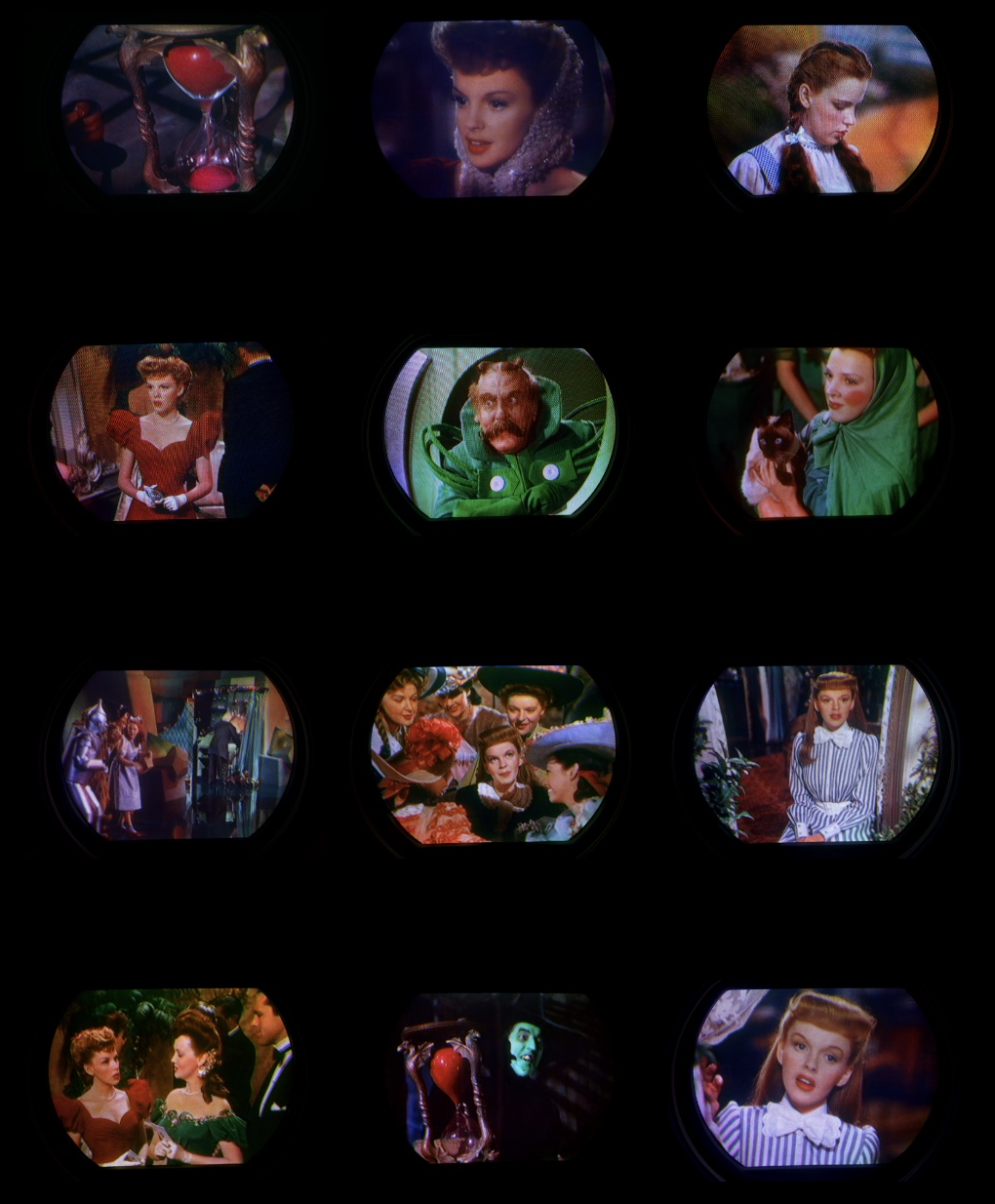 Evaluation of the Westinghouse H840CK15 with RCA 15GP22 image and color quality. Can we see extended greens and reds from the 1953 NTSC color phosphors offered by this CRT? This next test has the Sony A6300 set up for RAW quality, superior scene selection ( more sensitive light detection), ISO 250, aspect ratio 3:2 changed from 16:9, Adobe RGB, F/4.5, 25 mm, 1/20s. We used the same settings for all images. Set on a tripod, we filled the viewfinder with the screen image as best we could. I think you will notice the lower saturation levels compared to my usual screenshots. What I’ve discovered with RAW is the increased dynamic range and detail. With the Affinity photo editor, it’s like calibrating a color television or monitor. We first tried to get the grey scale (the photo) right and hopefully everything else falls in place. Most of the editing was focused around the exposure, contrast and brightness settings. We tweaked black levels at times. We avoided picture enhancements. I like to say when first doing this RAW editing, it’s like when we got our first color TV. The tendency is to over saturate, but then I discovered how over saturation interacts with other colors and details. These photos reveals some of the weakness’s of this particular 15GP22. In most shots, there is a lighter band at the top of the screen. This is where Mike could not get the convergence perfect. You may notice a purity issue in the lower right corner and a portion of the left center at the edge of screen. In dark scenes (the witch and hour glass) there is a vertical faint band of light, center screen, top to bottom. Most of the time it’s not noticeable and low light. 86% of the light energy is blocked by the shadow mask. This test used DVD’s of the Wizard Of Oz and Meet In St. Louis. We hope to refine our craft as we continue to learn with further evaluations, using different movies, particularly Technicolor 3 strip movies. Caution, very large files from 75 to 95 MB’s. View on an extended color gamut monitor if possible. Newer iPads have P3 color gamut. TIFF 16 BIT RGB, P3 COLOR SPACE. https://visions4netjournal.com/wp-co...9074A781D.tiff https://visions4netjournal.com/wp-co...5ECC9E42D.tiff https://visions4netjournal.com/wp-co...7CCA5AD24.tiff https://visions4netjournal.com/wp-co...F9F184D93.tiff https://visions4netjournal.com/wp-co...E8F797821.tiff https://visions4netjournal.com/wp-co...C7A4F92AE.tiff https://visions4netjournal.com/wp-co...3F6DE0261.tiff https://visions4netjournal.com/wp-co...A92716187.tiff https://visions4netjournal.com/wp-co...DACE65D99.tiff https://visions4netjournal.com/wp-co...36D4CF92A.tiff https://visions4netjournal.com/wp-co...19CCBF55D.tiff https://visions4netjournal.com/wp-co...656F8F89D.tiff
__________________
|
|
#14
03-04-2021, 02:35 PM
|
||||
|
||||
|
I've had a little more time to look at some of these, and they look great.
They show a fact of life for photographing an image consisting of bright spots of light with dark spaces in between, and that is that the exposure must be set so that the bright spots don't get clipped. Since part of the image area is black, the average over an area is reduced. Therefore, an object like Judy Garland's white neck bow is represented as less than full white. (See https://visions4netjournal.com/wp-co...DACE65D99.tiff) There is no way around this when you are photographing the dot structure at full resolution. It does not look bad when the image is viewed by itself with no normally exposed image next to it on the same monitor; it's only like turning the monitor brightness down. If you want a brighter version, the only way is to reduce the resolution until the dots are smeared together (and also without moire' patterns), which would defeat the purpose of accurately depicting the full image quality.
|
|
#15
03-04-2021, 11:44 PM
|
||||
|
||||
|
My eyes were opened when I saw the results of Tiff photography and what a difference when dropping down to ISO 250. I tried to expose the neck bow better. It’s better then the Jpeg. You can see traces of transparent lace as well as the curtain. The smearing is gone.
Thanks for the tips. Since using Tiff, I won’t go back to Jpeg except casual shots.
__________________
|
| Audiokarma |
 |
| Thread Tools | |
| Display Modes | |
|
|








 Hybrid Mode
