
|
|
|
#1
 12-30-2024, 04:56 PM
|
||||
|
||||
|
Sony M3 cam and CCU M3
A long shot here for help with a manual/help for the CCU-M3. The camera is in great shape on the CCU but I cannot get the RGB outs to work. Analog is good on VBS. The G/sync shows nothing. I can see luminance from the VBS out to G but the G out is nothing. I am wondering if the CCU wants sync sent to it to light up the G/sync. I am hoping to use a RGB>HDMI converter I have to get to a modern switcher. That converter does work from a DVD RGB out.
__________________
“Once you eliminate the impossible...whatever remains, no matter how improbable, must be the truth." Sherlock Holmes. 
|
|
#2
12-30-2024, 07:10 PM
|
|||
|
|||
|
I didn't download but try this
https://archive.org/download/manual_...DE_FR_text.pdf
|
|
#3
12-30-2024, 10:07 PM
|
|||
|
|||
|
Do you have the camera CCU mode enabled? switch on back plus check the switch settings on the encoder (last board) on the inside. They don't need any sync to make them light up the particular port and if the composite output is working I'd look at the cable connections inside both the camera, CCU and the cable ends themselves. I don't recall if the CCU does the encoding of the R/G/B to composite internally or if it just passes the camera thru with these. I had the DXC-M3A set up for EFP to a BVU-150 and later to a BVW-35 so I never had much call to use the CCU for these.
Last edited by ARC Tech-109; 12-30-2024 at 10:14 PM.
|
|
#4
12-31-2024, 03:27 PM
|
||||
|
||||
|
Solved...for now! Both of you gave me the clues to look for. The M3A is a different animal. It is an improved version of the M3, mostly with a better back-end connector assembly and controls. I suspect the innards are mostly the same. The CCU seems to be good for both M3 versions, Doug, the CCU manual was silent on the RGB connections but is saved here. Thanks. And ARC's mention of switches is absent on my cam or CCU. So, I went to the M3AP camera manual and there it was with no mention of switch positions. I found the 14-pin connector pinout page and found two tables. One cable type is for a VTR connection and another for a CCU connection, not mentioned in the CCU manual. The short VTR cable I have uses the RGB pins for data and alarm connections from the VTR. RGB is only available on the long form CCU only cable. 10m or more. My error with the wrong cabIe. I don't think I have done any damage but now the hunt for the CCU cable begins. And if anyone has one around...
__________________
“Once you eliminate the impossible...whatever remains, no matter how improbable, must be the truth." Sherlock Holmes.
|
|
#5
12-31-2024, 11:15 PM
|
|||
|
|||
|
Might try market place on
https://www.digitalfaq.com/forum/ Maybe down on the bottom under video http://www.kenselectronics.com/ Jeff at Chester elec had Sony parts https://chesterelectronics.com/ Post pictures of the connectors for the cable might help me visualize. Maybe here to https://www.cameratim.com/electronic...eo-connectors/ Happy new year
|
| Audiokarma |
|
#6
01-13-2025, 07:04 AM
|
|||
|
|||
|
You can also make your own CCU cable from the pinouts. I went this route at ArcTech's suggestion, to make an adapter to the 26 pin for a BVW.
The two parts you need are: JRC16BP-14S(71) To connect to the camera JRC16BP-14P(71) To connect to the CCU. Attached are the catalog for the connectors and the instructions to use it.
|
|
#7
06-30-2025, 04:35 PM
|
||||
|
||||
|
I have managed to assemble a complete 1985 or so Sony M3 3-tube camera kit with the early DC battery pack being the only local power...not the later M3A. Just an update for now and photos from today. Better capture photos later.
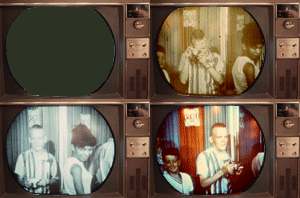
I have the camera, CCU-M3, PS with DIN connector, mount plate, Fuji lens, zoom/focus kit, VTR cable, CCU cable, both viewfinders, and a new tripod with two panhandles, The camera with lens and big viewfinder weighs in at 16lbs. A first test shows the camera working fine with the PS only on the short VTR cable. A slight problem with the IR filter being a bit cloudy but useable..the ongoing curse of these 80's cameras. First look shows a slight reg needed at the top. W/B balance works fine. Auto center works fine but seems limited to the center only. And it needs a lot of light. The tubes seem fine. If you have the CCU-M3 needed for the RGB, the cable is the trick to it working. The short 2 meter cable is a VTR only cable carrying composite video, audio, power and signaling to/from the VTR plus return video on it's pinouts. It will work with the CCU. The longer 10 meter (or more) is the CCU version cable giving up the audios, replacing them with RGB and headset audio on different pins. The composite remains. The CCU cable pinout does not show the RGB as shielded. Not sure what is happening in the CCU. It also got the RGB going. For RGB, I hope to use a RGB>HDMI converter to a Clearclick HD capture brick in via HDMI. I have a Sony DVD player that takes composite video in for a color monitor. Some quick pics below of first light. If you have donor IR filter, it would be a help.
__________________
“Once you eliminate the impossible...whatever remains, no matter how improbable, must be the truth." Sherlock Holmes. Last edited by Dave A; 06-30-2025 at 09:25 PM.
|
|
#8
06-30-2025, 06:42 PM
|
||||
|
||||
|
Very nice!
|
|
#9
06-30-2025, 08:40 PM
|
|||
|
|||
|
Wow that looks great
|
 |
|
|





 Linear Mode

